
Running Claude Code Free with OpenRouter on Mac (Complete Setup Guide)#
A practical guide born from hands-on trial and error. No fluff — just what actually worked.
🎯 The Goal#
Claude Code is Anthropic’s powerful agentic coding CLI. It reads your codebase, writes and edits files, runs bash commands, and reasons about your project like a senior engineer. But running it against Anthropic’s API isn’t free.
The goal: run Claude Code at zero cost by routing it through OpenRouter’s free model tier — while keeping the full Claude Code experience intact, and making the setup portable across projects.
Environment: Mac Mini M4 · macOS · Claude Code v2.1.72
🏗️ Architecture Overview#
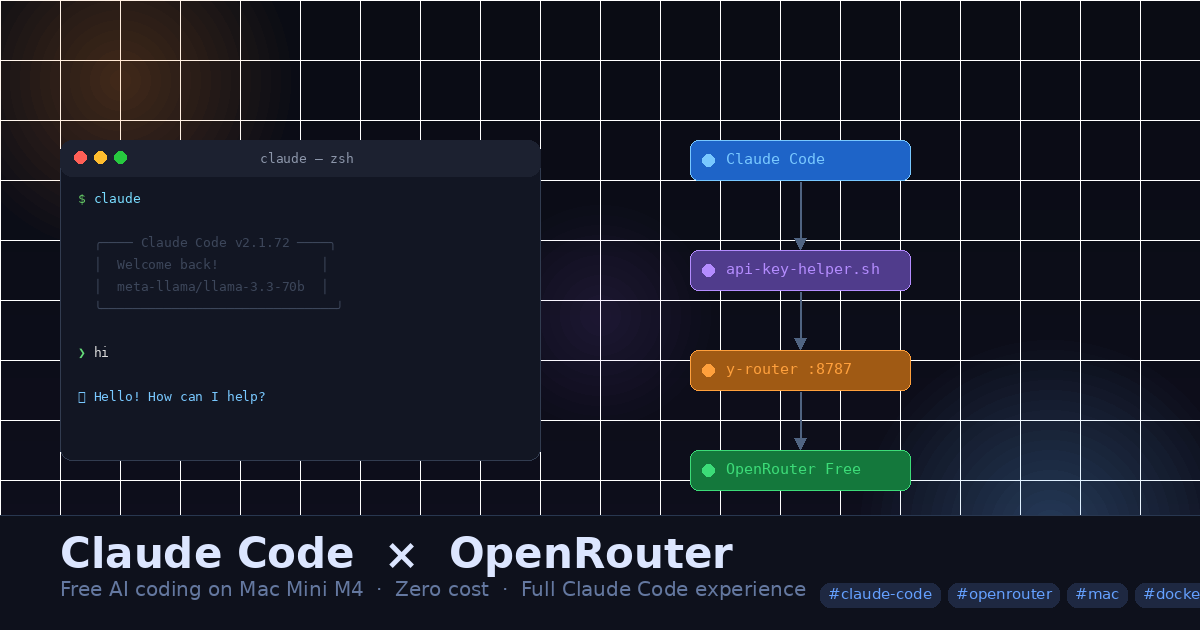
Before diving into steps, here’s how the final setup fits together:
graph TD
A([👨💻 You run: claude]) --> B[Claude Code v2.1.72]
B --> C[api-key-helper.sh
Provides key + sets model]
C --> D[settings.local.json
Project config]
B --> E[y-router
localhost:8787]
E --> F[OpenRouter API
openrouter.ai/api/v1]
F --> G([🆓 Free Model
e.g. llama-3.3-70b])
style A fill:#4a90d9,color:#fff
style G fill:#27ae60,color:#fff
style E fill:#e67e22,color:#fff
Why the middle layer? Claude Code sends requests in Anthropic’s native message format. OpenRouter expects OpenAI format. Without y-router translating between them, every model call silently fails.
⚙️ Pre-requisites#
Complete these once. They are referenced throughout the guide — skip any you already have.
Node.js & npm#
node --version   # need v18+
npm --version
If missing:
brew install node
Claude Code CLI#
claude --version
If missing:
npm install -g @anthropic-ai/claude-code
Docker Desktop#
docker --version
If missing:
brew install --cask docker
open /Applications/Docker.app   # start the daemon
Wait ~30 seconds for Docker Desktop to fully start, then verify with
docker ps.
OpenRouter API Key#
Sign up free at openrouter.ai → Keys → create a key. Free tier requires no credit card. Copy the key — it starts with sk-or-.
🚧 Why This Is Harder Than It Looks#
On paper: point ANTHROPIC_BASE_URL at OpenRouter, set an API key, done. In practice, three things get in the way:
1. Claude Code v2.1.72 forces a login screen even when environment variables are already set. There is no flag to skip it.
2. The login flow creates a conflicting auth session. Once you log in, Claude Code stores an OAuth managed key. This then conflicts with any ANTHROPIC_API_KEY you’ve set, producing:
⚠ Auth conflict: Both a token and an API key are set.
3. Anthropic ↔ OpenRouter format mismatch. Claude Code sends Anthropic-format requests. OpenRouter expects OpenAI format. Every model returns “model not found” or silently fails — even valid free model slugs.
The solution to all three is the combination below.
🛠️ Setup — Step by Step#
Step 1 — Clean Slate#
Wipe any existing Claude Code auth state before starting:
claude /logout
rm ~/.claude.json
Verify no conflicting env vars:
env | grep -i anthropic
If ANTHROPIC_API_KEY or ANTHROPIC_AUTH_TOKEN appear in output, remove them from your ~/.zshrc / ~/.zprofile and unset them:
unset ANTHROPIC_API_KEY
unset ANTHROPIC_AUTH_TOKEN
Step 2 — Start y-router#
y-router is a lightweight proxy that translates Anthropic-format requests to OpenRouter format. It runs as a Docker container on localhost:8787.
Pre-requisite: Docker Desktop must be running. ↑ See Pre-requisites
git clone https://github.com/luohy15/y-router.git ~/Workspace/AI/y-router
cd ~/Workspace/AI/y-router
cp docker.env.example docker.env
docker-compose up -d
Verify it’s healthy:
docker ps
You should see:
y-router-y-router-1 Up (healthy) 0.0.0.0:8787->8787/tcp
Step 3 — Create the API Key Helper Script#
This is the key insight. Claude Code’s login screen cannot be bypassed with environment variables alone in v2.1.72. The apiKeyHelper config option runs a shell script instead — completely skipping the login flow.
The script also dynamically picks a model from your free model list by index, so switching when rate-limited is just changing one number.
Create ~/.claude/api-key-helper.sh:
#!/bin/bash

# ✏️ Change this number to switch models (0 = first, 1 = second, etc.)
MODEL_INDEX=0

MODELS=(
  "arcee-ai/trinity-large-preview:free"
  "meta-llama/llama-3.3-70b-instruct:free"
  "mistralai/mistral-small-3.1-24b-instruct:free"
  "qwen/qwen3-coder:free"
  "google/gemma-3-27b-it:free"
  "nousresearch/hermes-3-llama-3.1-405b:free"
  "openai/gpt-oss-120b:free"
  "openai/gpt-oss-20b:free"
  "stepfun/step-3.5-flash:free"
  "z-ai/glm-4.5-air:free"
)

# Validate index is in range
if [ $MODEL_INDEX -ge ${#MODELS[@]} ]; then
  echo "ERROR: MODEL_INDEX=$MODEL_INDEX is out of range (0-$((${#MODELS[@]}-1)))" >&2
  exit 1
fi

SELECTED_MODEL=${MODELS[$MODEL_INDEX]}

# Find settings.local.json relative to where claude is launched from
SETTINGS="$(pwd)/.claude/settings.local.json"

if [ ! -f "$SETTINGS" ]; then
  echo "ERROR: settings.local.json not found at $SETTINGS" >&2
  exit 1
fi

python3 -c "
import json, sys
try:
    with open('$SETTINGS') as f:
        s = json.load(f)
except json.JSONDecodeError as e:
    print(f'ERROR: Invalid JSON in settings.local.json: {e}', file=sys.stderr)
    sys.exit(1)
if 'env' not in s:
    print('ERROR: Missing env key in settings.local.json', file=sys.stderr)
    sys.exit(1)
s['env']['ANTHROPIC_MODEL'] = '$SELECTED_MODEL'
with open('$SETTINGS', 'w') as f:
    json.dump(s, f, indent=2)
"

[ $? -ne 0 ] && exit 1

# Output the API key — required by apiKeyHelper
echo "sk-or-your-openrouter-key-here"
chmod +x ~/.claude/api-key-helper.sh
Replace
sk-or-your-openrouter-key-herewith your actual OpenRouter key.
Step 4 — Create settings.local.json in Your Project#
Inside your project folder:
mkdir -p /your/project/.claude
Create /your/project/.claude/settings.local.json:
{
  "env": {
    "ANTHROPIC_BASE_URL": "http://localhost:8787",
    "ANTHROPIC_MODEL": "meta-llama/llama-3.3-70b-instruct:free",
    "ANTHROPIC_SMALL_FAST_MODEL": "qwen/qwen3-4b:free"
  },
  "apiKeyHelper": "/Users/yourusername/.claude/api-key-helper.sh"
}
ANTHROPIC_MODELgets overwritten by the script each launch. The value here is just a fallback placeholder. Replaceyourusernamewith your actual Mac username.
Step 5 — Launch Claude Code#
From your project root:
claude
The welcome screen should show your free model in the header — no login prompt, no auth conflict warnings:
╭─────────────────────────────────────────╮
│  meta-llama/llama-3.3-70b… · API Billing│
│  /your/project                          │
╰─────────────────────────────────────────╯
Type hello to confirm it responds. ✅
🔄 Switching Models When Rate Limited#
Free models have rate limits. When you hit one, Claude Code shows a 429 error and retries automatically. If it keeps failing:
- Open
~/.claude/api-key-helper.sh - Change
MODEL_INDEX=0to any other number (e.g.MODEL_INDEX=2) - Save and relaunch
claude
The script updates settings.local.json automatically.
Check which free models are available on your account#
curl -s https://openrouter.ai/api/v1/models \
  -H "Authorization: Bearer sk-or-your-key" \
  | python3 -c "
import json,sys
data = json.load(sys.stdin)
free = [m['id'] for m in data['data'] if ':free' in m['id']]
print('\n'.join(sorted(free)))
"
Update the MODELS array in api-key-helper.sh with the results.
🚀 Auto-Start y-router on Mac Boot#
y-router must be running before launching Claude Code. Add to your ~/.zshrc to start it automatically:
# Auto-start y-router if Docker is running
if docker info > /dev/null 2>&1; then
  (cd ~/Workspace/AI/y-router && docker-compose up -d > /dev/null 2>&1)
fi
🔧 Troubleshooting#
Auth conflict error on launch#
ANTHROPIC_API_KEY or ANTHROPIC_AUTH_TOKEN is set somewhere. Fix:
unset ANTHROPIC_API_KEY
unset ANTHROPIC_AUTH_TOKEN
claude /logout
Relaunch claude.
Model not found error#
The model slug is wrong or no longer available. Run the curl command above to get the current list and update your MODELS array.
settings.local.json not found#
Make sure you launch claude from the project root directory — the script looks for .claude/settings.local.json relative to pwd.
y-router not responding#
y-router stopped (e.g. after Mac restart). Restart:
cd ~/Workspace/AI/y-router && docker-compose up -d
✅ Summary#
graph LR
    A[Clean auth state] --> B[y-router running]
    B --> C[api-key-helper.sh created]
    C --> D[settings.local.json in project]
    D --> E[claude launched ✅]
    style E fill:#27ae60,color:#fff
| Component | Purpose |
|---|---|
| y-router (Docker) | Translates Anthropic ↔ OpenRouter request format |
| api-key-helper.sh | Bypasses login screen, sets model dynamically |
| settings.local.json | Per-project config, portable across all projects |
| OpenRouter free tier | Zero-cost model hosting |
The key insight that unlocked everything: apiKeyHelper is the only reliable way to bypass Claude Code’s forced login screen in v2.1.72. Environment variables alone are not enough. Once you bypass it cleanly, the rest falls into place.